|
GDAC Version 1.3 Documentation
|
The Database Management Class (DBMC) is the primary interaction point between your code and its database. This class is meant to have one instance per database you intend to connect to. Therefore, it's best to create a global singleton in your application as shown below:
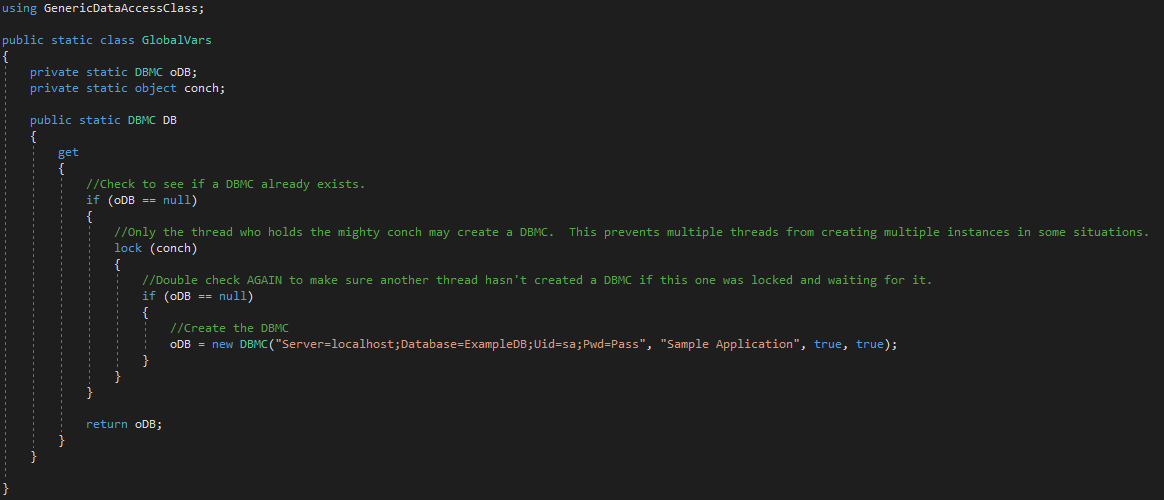
Declaring a DBMC constructor is a simple matter of specifying a connection string, and then supplying some options. Below are details on the functionality of the available options:
Required Parameters
| ConnectionString
|
String
|
MSSQL: Server=localhost;Database=ExampleDB;Uid=sa;Pwd=Pass
MS Access: Provider=Microsoft.ACE.OLEDB.12.0;Data Source=C:\myFolder\myAccessFile.accdb;Persist Security Info=False;
DSN: DSN=myDsn;Uid=myUsername;Pwd=Pass
|
The DBMC expects a valid connection string that would normally work with a SQL Client, ODBC, or OLE connection object. Any connection string normally compatible with these objects is typically accepted by the DBMC.
|
Optional Parameters
| ApplicationName
|
String
|
Test Application
AutomateEarth.com Website
Data Loader Utility
|
The application name is used in MSSQL connection strings to identify the source software to the SQL server. When calling functions like sp_who2, this name will appear as the connecting platform.
|
| SelectCaching
|
Boolean
|
True
False
|
This flag enables the caching features and timer throughout the DBMC. If calls are made including caching timeouts without activating this flag, no caches will ever be retained or hit. This feature introduces some slight overhead, so make sure to implement it if you activate it.
|
| ASPValidation
|
Boolean
|
True
False
|
ASP Validation changes the parameter cleaning method for string data types to watch for > and < symbols that are typically used for cross site script attacks and removes them.
|
| EnableChangeTracking
|
Boolean
|
True
False
|
Enabling Change Tracking will permanently enable change tracking features and service broker on your database. These features sometimes conflict with other advanced features of MSSQL servers and do add some overhead, so unless you intend to actually use the change tracking for performance tuning, it's best to be left off. Also note that this feature is only available on MSSQL server instances version 2008 and above.
|
| ChangeTrackingTableList
|
String Array
|
{"Customers", "Employees", "Vendors"}
{"Transactions", "Invoices", "Sales"}
null
|
Accepts a list of tables to enable change tracking features. Once again, this permanently enables change tracking features on a data table, and they sometimes conflict with other advanced features of MSSQL servers, so unless you actually plan on using a table for change tracking, do not include it in the list. This feature is once again, only available on MSSQL server istances version 2008 and above.
|
| ConnectionCleanupMethod
|
ConCleanupMethod
|
AggressiveScaling
NormalScaling
OneMinute
FiveMinute
TenMinute
FifteenMinute
ThirtyMinute
|
This determines how quickly extra connection objects in the pool will be cleaned up. The formula for NormalScaling (default) to determine the number of seconds a connection will remain is:
10 / NumberOfConnections * 60
Aggressive scaling is:
5 / NumberOfConnections * 60
All other settings simply drop connections if unused in that time frame.
|
The DBMC Also automatically attempts to use SSL certs and secure connections if available without additional configuration.
The DBMC includes some basic informational and profiling functions to help you work with other types of connections and to see some basic metrics on connections.
ServerName
The ServerName property returns the name of the server you are connected to.
ConnectionString
The ConnectionString property returns the origional connection string entered at instance creation.
TestConnection()
Allows you to test a connection string before declaring an instance of DBMC.
The CRUD functions are named after their SQL counterparts:
DBSelect()
The DBSelect function is intended to be used for queries that return data. That can mean a stored procedure, a select statement, or anything else. It returns a DataSet data type which allows for a multi-table result if the query returns more than one.
Required Parameters
| SQL
|
String
|
SELECT * FROM Customers
spGetCustomers
spGetCustomer @CustomerID
|
Select statement or stored proc to be run. When using GDAC parameters, you need to use an @ sign in front of a case-sensitive placeholder.
|
Optional Parameters
| ForceDeleteTime
|
Double
|
-1
60
500
|
When the query is run, if this flag is a positive number, the cache is checked for identical select statements that have been stored there (after parameters are evaluated). If a cache is found, it is used instead of pulling the dataset from the database. If a cache is not found, the query is pulled from the database, and a new cache is created that will remain in memory for the number of seconds specified here.
|
| RollDeleteTime
|
Double
|
-1
60
500
|
When the query is run, if this flag is a positive number, the cache is checked for identical select statements that have been stored there (after parameters are evaluated). If a cache is found, it is used instead of pulling the dataset from the database. If a cache is not found, the query is pulled from the database, and a new cache is created that will remain in memory for the number of seconds specified here. If the cache is used again before this timer expires, it is automatically reset.
|
| Parameters
|
Array of SQLParameter instances
List of SQLParameter instances
Collection of SQLParameter instances
Type implementing IEnumerable of SQLParameters
|
{new SQLParameter("CustomerID", Request.Params("CustomerID"))}
New List<SQLParameter>()
|
This parameter expects a list, array, or other enumeratable data type containing SQLParameter instances. Before the query runs against the database, the DBMC goes through this list of parameters and replaces the text flags with secure, formatted versions of the parameter values.
|
| IsSelect
|
Boolean
|
True
False
|
Sometimes stored procedures are written for inserting, but they return data anyway so you will need to use DBSelect. If you are using DBSelect to insert data however, this flag needs to be set to False so that cross site script checks happen on the parameter data being inserted.
|
DBAsyncSelect()
The DBAsyncSelect function is intended to be used for queries that return data. It is a quick mechanism for performing an asynchronous query. If desired, a callback method can be specified and will be run after the results return. The return value of the DBAsync functions is a thread instance. This thread is the thread that the query is being run on and it can be joined or aborted if desired.
Required Parameters
| SQL
|
String
|
SELECT * FROM Customers
spGetCustomers
spGetCustomer @CustomerID
|
Select statement or stored proc to be run. When using GDAC parameters, you need to use an @ sign in front of a case-sensitive placeholder.
|
Optional Parameters
| ForceDeleteTime
|
Double
|
-1
60
500
|
When the query is run, if this flag is a positive number, the cache is checked for identical select statements that have been stored there (after parameters are evaluated). If a cache is found, it is used instead of pulling the dataset from the database. If a cache is not found, the query is pulled from the database, and a new cache is created that will remain in memory for the number of seconds specified here.
|
| RollDeleteTime
|
Double
|
-1
60
500
|
When the query is run, if this flag is a positive number, the cache is checked for identical select statements that have been stored there (after parameters are evaluated). If a cache is found, it is used instead of pulling the dataset from the database. If a cache is not found, the query is pulled from the database, and a new cache is created that will remain in memory for the number of seconds specified here. If the cache is used again before this timer expires, it is automatically reset.
|
| Parameters
|
Array of SQLParameter instances
List of SQLParameter instances
Collection of SQLParameter instances
Type implementing IEnumerable of SQLParameters
|
{new SQLParameter("CustomerID", Request.Params("CustomerID"))}
New List<SQLParameter>()
|
This parameter expects a list, array, or other enumeratable data type containing SQLParameter instances. Before the query runs against the database, the DBMC goes through this list of parameters and replaces the text flags with secure, formatted versions of the parameter values.
|
| IsSelect
|
Boolean
|
True
False
|
Sometimes stored procedures are written for inserting, but they return data anyway so you will need to use DBSelect. If you are using DBSelect to insert data however, this flag needs to be set to False so that cross site script checks happen on the parameter data being inserted.
|
| Callback
|
VB Function with signature: Sub ReturnResults(Result As AsyncQueryResult)
C# Function with signature: void ReturnResults(AsyncQueryResult Result)
|
VB Syntax: AddressOf ReturnResults
C# Syntax: ReturnResults
NULL / Nothing
|
If using the Async method, you can choose to have the GDAC call a given function when the threaded statement returns. If you run the Async method without supplying a callback function, your select statement still executes, but the results are ignored. The callback function is called on the new thread, so make sure to use an invoke if neccessary.
|
DBInsert()
The DBInsert function is intended to be used for queries that create new records. That can mean a stored procedure, or an insert statement, or anything else. It returns an integer data type which the GDAC attempts to fill with the number of rows affected by your statement (not counting logging).
Required Parameters
| SQL
|
String
|
INSERT INTO Customers VALUES ('John', 'Doe')
spInsertCustomer @FName, @LName
INSERT INTO Customers SELECT FName, LName FROM Leads WHERE LeadID = @LeadID
|
Insert statement or stored proc to be run. When using GDAC parameters, you need to use an @ sign in front of a case-sensitive placeholder.
|
Optional Parameters
| Parameters
|
Array of SQLParameter instances
List of SQLParameter instances
Collection of SQLParameter instances
Type implementing IEnumerable of SQLParameters
|
{new SQLParameter("CustomerID", Request.Params("CustomerID"))}
new List<SQLParameter>()
|
This parameter expects a list, array, or other enumeratable data type containing SQLParameter instances. Before the query runs against the database, the DBMC goes through this list of parameters and replaces the text flags with secure, formatted versions of the parameter values.
|
| Bulk-Insert Parameters
|
List of List of SQLParameter instances
|
new List<List<SQLParameter>>()
|
This parameter expects a list of lists of SQLParameter instances. Before the query runs against the database, the DBMC parses your insert command and looks for either a stored procedure call, or a simple insert statement. The DBMC then goes through each list of parameters and replaces the text flags with secure, formatted versions of the parameter values, and builds out bulk-insert sytax for insert statements, or multiple procedure calls for stored procs.
|
DBAsyncInsert()
The DBAsyncInsert function is intended to be used for queries that create new records. If desired, a callback method can be specified and will be run after the statement completes. The return value of the DBAsync functions is a thread instance. This thread is the thread that the query is being run on and it can be joined or aborted if desired.
Required Parameters
| SQL
|
String
|
INSERT INTO Customers VALUES ('John', 'Doe')
spInsertCustomer @FName, @LName
INSERT INTO Customers SELECT FName, LName FROM Leads WHERE LeadID = @LeadID
|
Insert statement or stored proc to be run. When using GDAC parameters, you need to use an @ sign in front of a case-sensitive placeholder.
|
Optional Parameters
| Parameters
|
Array of SQLParameter instances
List of SQLParameter instances
Collection of SQLParameter instances
Type implementing IEnumerable of SQLParameters
|
{new SQLParameter("CustomerID", Request.Params("CustomerID"))}
New List<SQLParameter>()
|
This parameter expects a list, array, or other enumeratable data type containing SQLParameter instances. Before the query runs against the database, the DBMC goes through this list of parameters and replaces the text flags with secure, formatted versions of the parameter values.
|
| Callback
|
VB Function with signature: Sub ReturnResults(Result As AsyncNonQueryResult)
C# Function with signature: void ReturnResults(AsyncNonQueryResult Result)
|
VB Syntax: AddressOf ReturnResults
C# Syntax: ReturnResults
NULL / Nothing
|
If using the Async method, you can choose to have the GDAC call a given function when the threaded statement returns. If you run the Async method without supplying a callback function, your statement still executes, but the results are ignored. The callback function is called on the new thread, so make sure to use an invoke if neccessary.
|
DBUpdate()
The DBUpdate function is intended to be used for queries that modify records. That can mean a stored procedure, or an update statement, or anything else. It returns an integer data type which the GDAC attempts to fill with the number of rows affected by your statement (not counting logging).
Required Parameters
| SQL
|
String
|
Update Customers SET FName = 'John', LName = 'Doe' WHERE CustID = 5
UPDATE Customers SET FName = @FName, LName = @LName WHERE CustID = @CustID
spUpdateCustomer @CustID, @FName, @LName
|
Update statement or stored proc to be run. When using GDAC parameters, you need to use an @ sign in front of a case-sensitive placeholder.
|
Optional Parameters
| Parameters
|
Array of SQLParameter instances
List of SQLParameter instances
Collection of SQLParameter instances
Type implementing IEnumerable of SQLParameters
|
{new SQLParameter("CustomerID", Request.Params("CustomerID"))}
New List<SQLParameter>()
|
This parameter expects a list, array, or other enumeratable data type containing SQLParameter instances. Before the query runs against the database, the DBMC goes through this list of parameters and replaces the text flags with secure, formatted versions of the parameter values.
|
DBAsyncUpdate()
The DBAsyncUpdate function is intended to be used for queries that modify records. If desired, a callback method can be specified and will be run after the statement completes. The return value of the DBAsync functions is a thread instance. This thread is the thread that the query is being run on and it can be joined or aborted if desired.
Required Parameters
| SQL
|
String
|
Update Customers SET FName = 'John', LName = 'Doe' WHERE CustID = 5
UPDATE Customers SET FName = @FName, LName = @LName WHERE CustID = @CustID
spUpdateCustomer @CustID, @FName, @LName
|
Update statement or stored proc to be run. When using GDAC parameters, you need to use an @ sign in front of a case-sensitive placeholder.
|
Optional Parameters
| Parameters
|
Array of SQLParameter instances
List of SQLParameter instances
Collection of SQLParameter instances
Type implementing IEnumerable of SQLParameters
|
{new SQLParameter("CustomerID", Request.Params("CustomerID"))}
New List<SQLParameter>()
|
This parameter expects a list, array, or other enumeratable data type containing SQLParameter instances. Before the query runs against the database, the DBMC goes through this list of parameters and replaces the text flags with secure, formatted versions of the parameter values.
|
| Callback
|
VB Function with signature: Sub ReturnResults(Result As AsyncNonQueryResult)
C# Function with signature: void ReturnResults(AsyncNonQueryResult Result)
|
VB Syntax: AddressOf ReturnResults
C# Syntax: ReturnResults
NULL / Nothing
|
If using the Async method, you can choose to have the GDAC call a given function when the threaded statement returns. If you run the Async method without supplying a callback function, your statement still executes, but the results are ignored. The callback function is called on the new thread, so make sure to use an invoke if neccessary.
|
DBDelete()
The DBDelete function is intended to be used for queries that delete records. That can mean a stored procedure, or a delete statement, or anything else. It returns an integer data type which the GDAC attempts to fill with the number of rows affected by your statement (not counting logging).
Required Parameters
| SQL
|
String
|
DELETE FROM Customers WHERE DATEPART(YEAR, LastPurchaseDate) < DATEPART(YEAR, GETDATE()) - 5
DELETE FROM Customers WHERE CustomerID = @CustID
spDeleteCustomer @CustID
|
Delete statement or stored proc to be run. When using GDAC parameters, you need to use an @ sign in front of a case-sensitive placeholder.
|
Optional Parameters
| Parameters
|
Array of SQLParameter instances
List of SQLParameter instances
Collection of SQLParameter instances
Type implementing IEnumerable of SQLParameters
|
{new SQLParameter("CustomerID", Request.Params("CustomerID"))}
New List<SQLParameter>()
|
This parameter expects a list, array, or other enumeratable data type containing SQLParameter instances. Before the query runs against the database, the DBMC goes through this list of parameters and replaces the text flags with secure, formatted versions of the parameter values.
|
DBAsyncDelete()
The DBAsyncDelete function is intended to be used for queries that delete records. If desired, a callback method can be specified and will be run after the statement completes. The return value of the DBAsync functions is a thread instance. This thread is the thread that the query is being run on and it can be joined or aborted if desired.
Required Parameters
| SQL
|
String
|
DELETE FROM Customers WHERE DATEPART(YEAR, LastPurchaseDate) < DATEPART(YEAR, GETDATE()) - 5
DELETE FROM Customers WHERE CustomerID = @CustID
spDeleteCustomer @CustID
|
Delete statement or stored proc to be run. When using GDAC parameters, you need to use an @ sign in front of a case-sensitive placeholder.
|
Optional Parameters
| Parameters
|
Array of SQLParameter instances
List of SQLParameter instances
Collection of SQLParameter instances
Type implementing IEnumerable of SQLParameters
|
{new SQLParameter("CustomerID", Request.Params("CustomerID"))}
New List<SQLParameter>()
|
This parameter expects a list, array, or other enumeratable data type containing SQLParameter instances. Before the query runs against the database, the DBMC goes through this list of parameters and replaces the text flags with secure, formatted versions of the parameter values.
|
| Callback
|
VB Function with signature: Sub ReturnResults(Result As AsyncNonQueryResult)
C# Function with signature: void ReturnResults(AsyncNonQueryResult Result)
|
VB Syntax: AddressOf ReturnResults
C# Syntax: ReturnResults
NULL / Nothing
|
If using the Async method, you can choose to have the GDAC call a given function when the threaded statement returns. If you run the Async method without supplying a callback function, your statement still executes, but the results are ignored. The callback function is called on the new thread, so make sure to use an invoke if neccessary.
|
The GDAC has built-in logging functionality that will log all database communications to a table called AppLog. The logging functionality uses the Async methods to write the logs so as not to impact the performance of the application for the sake of logging. This table can then be used to monitor database activity, identify inefficient queries, and identify good candidates for caching.
The first time the GDAC runs a query against a database, it attempts to write a log to the AppLog table. If the table is not found, or there is another error inserting into the log, the GDAC will not attempt to log again unless explicitly told to.
CreateAppLogTable()
The CreateAppLogTable function runs a CREATE TABLE command on the primary database that the GDAC is connected to and creates a table called AppLog. This table is in the correct format for the GDAC's automated logging to write to. If desired, some of the default columns can be deleted, all data types can be modified, and custom columns can be added to suit your application's needs.
Default Columns
| LogID
|
DECIMAL(18, 0)
|
True
|
Auto-Increments from 0 and is the primary key.
|
| Message
|
VARCHAR(MAX)
|
False
|
The statement that was run against the database.
|
| Command Type
|
VARCHAR(MAX)
|
False
|
The type of statement that was run against the database.
|
| TimeSpan
|
DECIMAL(18, 4)
|
False
|
The number of seconds the command took to run.
1.0000 = 1 second
0.0010 = 10 milliseconds
|
| Error
|
BIT
|
False
|
Whether the statement errored or not.
|
| CacheReturn
|
BIT
|
False
|
Whether the statement hit a cache or not.
|
| StackTrace
|
VARCHAR(MAX)
|
False
|
The stack trace of the database error message if applicable.
|
| EXMSG
|
VARCHAR(MAX)
|
False
|
The error message of the database error if applicable.
|
| LogTime
|
DATETIME
|
True
|
The time the log was written (after the statement finished running).
|
Note that if you plan to leave the logging table there as a permanent feature of your application, you may want to consider adding a trigger or maintenance task to delete records older than so many days, or to delete old rows after a certain threshold is hit.
ResetAppLog()
The ResetAppLog function resets the flag telling the GDAC to avoid logging. If the GDAC errors logging again, it will revert back to not logging again until this function is called once again, or the application is restarted.
The GDAC has the ability to cache the result of select statements. Details on creating and hitting caches can be found in the DBSelect() area of the CRUD Function documentation. These functions allow you to delete or otherwise manipulate the list of caches the GDAC is currently holding onto.
ClearCaches()
This function deletes caches from the held cache list. If calling it without the optional ContainingText parameter, it simply deletes all caches.
Optional Parameters
| ContainingText
|
String
|
""
Username
Customers
spLatestValue
CustomerID = 42
|
The text of each select statement that a cache is held for is checked to see if it contains this text.
Reccomendations for this value include: stored procedure names, column names, table names, where clauses, etc...
Note that this parameter is case-insensitive.
|
CleanForSQL()
This function is used to clean data for use in a SQL statement. Typically, you should use parameterized queries to perform field scrubbing, but if you need to concatenate a value into a statement or otherwise don't want to include the parameter class's auto-formatting, this function can be used directly to scrub for SQL and Cross-Site-Script (CSS) injections.
Required Parameters
| sField
|
String
|
Johnny
O'Hare
The customer didn't like the way we "cleaned" their product this time.
' OR 1 = 1; --injection attempt!
|
Some text to be scrubbed for special characters
|
Optional Parameters
| isSelect
|
Boolean
|
True
False
|
If the statement the cleaning is being used for is an insert/update/delete or a select. This impacts whether CSS is checked or just SQL Injection.
|
TestConnection()
Returns a True/False return on whether the GDAC can connect using a given connection string.
Required Parameters
| ConStr
|
String
|
MSSQL: Server=localhost;Database=ExampleDB;Uid=sa;Pwd=Pass
MS Access: Provider=Microsoft.ACE.OLEDB.12.0;Data Source=C:\myFolder\myAccessFile.accdb;Persist Security Info=False;
DSN: DSN=myDsn;Uid=myUsername;Pwd=Pass
|
The connection string to attempt a connection on
|
ConCount
This read-only property returns the current number of connections that are active against the database.
ServerName
This read-only property returns the connection.DataSource property of the connection object. This typically returns the server name even if using an ODBC connection.
ConnectionString
This read-only propery returns the connection string that the GDAC uses to create connections. You can use it to create one-off connection objects if you need them for any reason.
|
The SQLParameter class is the GDAC's internal parameter class. Typically, you will be creating an array or generic list of these classes and then submitting that list to one of the CRUD functions. The value parameter accepts a wide variety of input types.
Acceptable Types
| Nothing/null
|
Nothing/null
|
NULL
|
NULL
|
| Integer / Double / Decimal / Long
|
2
|
2
|
2
|
| DateTime
|
1/1/1900 12:00:00.000 AM
|
'1/1/1900 00:00:00.000'
|
#1900-01-01 00:00:00#
|
| String
|
O'Dell
|
'O''Dell'
|
'O''Dell'
|
| String Array
|
{"a", "b", "c"}
|
('a','b','c')
|
('a','b','c')
|
| Date Array
|
{1/1/1900, 1/1/2019 12:00:00 AM, 2/1/2018 5:00:00.123}
|
('1/1/1900 12:00:00.000 AM','1/1/2019 12:00:0.000 AM','2/1/2018 5:00:00.123 AM')
|
(#1900-01-01 00:00:00#,#2019-01-01 00:00:00#,#2018-02-01 05:00:00#)
|
| Integer Array / Double Array / Decimal Array / Long Array
|
{1, 2, 3}
|
(1,2,3)
|
(1,2,3)
|
| Boolean
|
True
|
'True'
|
True
|
| Data Table
|
Params.Add(New SQLParameter("DeficitCustomers", DB.DBSelect("SELECT CustomerID FROM Customers WHERE AmountOwed > 0")))
|
Attempts to create a new data type to contain the data, then create a variable of that type, and submit it to the database engine.
|
Exception thrown: Access databases cannot accept datatable parameters.
|
| TextBox
|
txtFullName (contains "John O'Hare")
|
'John O''Hare'
|
'John O''Hare'
|
| Label
|
lblFullName (contains "John O'Hare")
|
'John O''Hare'
|
'John O''Hare'
|
| Enum
|
FirstEnumValue
|
0
|
0
|
|
The ChangeTracking class is a datatype that you will get back when you call the GDAC's ChangeTrackingStart() function. An instance of this class represents the open communication line from your application to the database.
ChangeTrackingStart()
This function is available on your DBMC instance. Given a qualifying SQL statement, it will set up a connection and return a ChangeTracking object.
Required Parameters
| SQL
|
String
|
SELECT CustomerID, FirstName, LastName FROM dbo.Customers
|
Provide a select statement to watch for changes in the results.
NOTE: Change tracking select statements must not contain an asterisk(*) when specifying return columns.
NOTE: Change tracking select statements must have the schema specified on table names. This typicaly just means adding "dbo." to the front of your table name.
|
OnChange Event
The OnChange event is an event that raises whenever the resulting data from your query is modified in the database. Note that the SqlNotificationEventArgs class can contain some interesting details on exactly what has triggered the event.
Dispose()
The dispose function does what it usually does: cleans up the object after it's no longer needed. It will clean itself up after 10 minutes if no subscriptions to OnChange have been active in that period.
|
|
|