DevWorx.AutomateEarth.com
Generic Data Access Class (GDAC)
The GDAC is one of the very first generic tools I'd ever written and is still one of my favorites. This class library is designed to be a replacement for how your VB or C# .NET application communicates with its database(s).

Now I know what you're thinking... "Why would I want to use something other than the standard .NET connection, data adapter, and command objects? Aren't the microsoft SQL data tools already optimized as much as they possibly can be?"

I'm here to tell you, the answer is: "Well, Yes and No." Yes, the microsoft objects are extremely optimized already. I have worked on many, many, many projects without using this GDAC, and it is obviously quite possible to go your entire career without building a data access class like this one. However, when working on those projects, I found myself repetatively rewriting the same coding patterns over and over again, and it's a LOT of code to rewrite so many times for some of this extremely useful (but moderately complex) functionality. It's easy to make mistakes when recoding them, and your management doesn't always see the benefits of spending an extra 20 hours in a project to add a caching layer to some queries.

I can also tell you, that I built this class for speed and efficiency. It is written so that the syntax is faster to write than using the standard .NET controls, but without the performance hit or learning curve of more advanced data access libraries like Entity Framework. It multi-threads, it caches, and it cleans up after itself so you don't have to worry about all of the details typically associated with database interactions.

This solution for database communication has some benefits over the standard SQL objects:
  • FAR less code per query!
  • Built-In support for forced and/or rolling data caching
  • Object is multi-thread safe
  • Connection pool is managed automatically
  • Simpler parameter specification
  • Automatic Query logging complete with timespan data for query profiling
  • Compatible with many types of databases and connections
  • SQL Change Tracking Technology lets your database update you!
+ Less Code

The pattern for working with the standard SQL objects in large projects involves these steps:
  1. Get Connection String
  2. Create connection object
  3. Set timeout of connection object (if it's a concern)
  4. Open connection
  5. Create Command/Reader/DataAdapter classes using connection
  6. Set SQL statement
  7. Set Parameters (if needed)
  8. Set command timeout (if it's a concern)
  9. Create data response object
  10. Use your data class to perform database action and fill out response object
  11. Close Connection
  12. Dispose Objects
Here is some sample C# code to get a single boolean value by running a parameterized stored procedure:

Standard .NET Objects GDAC

Simple static GDAC select statements can even be so compact that they can be run in-line in a comparison statement:

+ Data Caching

Ok, admittedly, data caching isn't that difficult of a coding structure to implement if you're looking to hold a value until the program restarts, or you pick a clever location to scope your variable. You just declare it somewhere that it will stick around for as long as you want, pull the value if it's blank, and if it's not blank then use it instead of pulling it. Not a difficult pattern.

However, as soon as someone says "Rolling Cache" or "Limited-Time Cache", it introduces a time-out check, and you have to track the last time the cache(s) were used and/or when they were created, and it could create a memory leak, or a thread locking issue, or concurrency issue, or god only knows what the heck else.

That is where the GDAC's caching mechanisms come in. The GDAC is capable of holding an unlimited number of rolling and/or forced time-out caches. It monitors them consistantly with a timer wheel pattern to eliminate expired caches, while also not using any excess processor cycles on non-critical timer object elapse events. It is compatible with parameters and will hold different cached values for different supplied parameters, and if a matching cache is found and used, a database connection is not even procured unless logging is enabled.

A rolling cache is a cache that stays alive as long as it is used within the time period. This type of cache is great for situations where you know a query is going to be run several times in a short time period, but then will no longer be used for a long period after the burst.

A Limited-Time cache (or Force-Delete cache), is a cache that is always deleted so many seconds after it was first created. This type of cache is useful for an extremely heavy use query that needs to update occasionally whether the user(s) are using it or not.

Both of these systems can be combined as well, with the Force-Delete cache providing a final time limit for the cache, with the rolling-cache time providing an early-delete timeout if the user(s) are no longer using it to free up server memory.

To enable the caching timer wheel and caching checks, you have to first activate it during the creation of the class:



Then you can use the caching in queries (note that the numbers are in seconds, and when using parameters you must specify whether the select statement is truely a select, or really a stored proc that does both insert/update/delete and selecting):
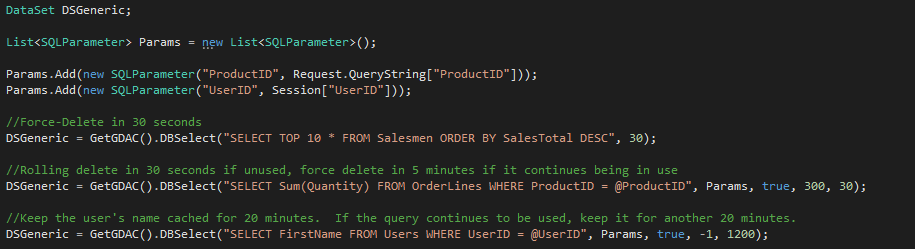


Occasionally it is neccessary to delete a cache. In the above example, if the user modified their first name in the database, you would need to delete that cache or the user is going to be very confused why it never takes effect. The GDAC has two overloads for deleting caches. One accepts no parameters and deletes all caches. The other searches through the caches and only deletes the ones with a text match.
+ Multi Thread Safe connection pool

I origionally designed this tool for a multi-thread application that needed to respond to socket requests from wall-mounted badge scanners within so many miliseconds or the calls would be considered 'failures'. I learned very quickly in that project that opening a connection to a database could sometimes be a costly operation, and that you couldn't just use one SQLConnection object throughout a multi-threaded application as they are not thread safe.

So what is a young, eager, fresh-out-of-college Jrud going to do about it? Write my own connection pooling code of course!

Later after learning how ASP.NET servers run page requests on different threads, I realized that this is also a perfect solution for ASP.NET website development as well.

As soon as you create a GDAC variable, an initial connection is opened to verify the connection string and a sample query run to retrieve the current datetime. That connection is thrown into a connection pool collection that goes up to 100 concurrent connections.

When you run any of the CRUD operations, if a cache isn't hit, the GDAC quickly realizes that it needs to obtain an unused connection object. It does this by working through the list of connections from oldest to newest checking each one to see if they are thread locked or not. Upon finding one that isn't thread locked, it immediately locks the connection to its thread, updates the last use timestamp, uses it for the query, and then releases the lock as soon as the query responds. If no unused connections are found, it creates a new one, locks it, and then adds it to the pool. After 100 connections are made, the GDAC will not create any more, and it will simply spin and wait for an open connection. This is because most SQL servers have a default connection limit of 100 connections per database.

Every few seconds a timer also runs to check the connection list to see if any have not been used recently or if any of the connection states are severed in any way. The GDAC's default kick-out threshhold tightens as more connections are added to the list. However, you can also select a more aggressive scaling or flat algorithm to determine the rate as well.

1 Connection = 10 Minutes
2 Connections = 5 Minutes
3 Connections = 3 Minutes 20 Seconds
4 Connections = 2 Minutes 15 Seconds
5 Connections = 2 Minutes
10 Connections = 1 Minute
50 Connections = 12 Seconds
+ Simpler Parameterized Queries

From my perspective, parameters serve two functions. The first is to prevent SQL injection attacks, and the second is to standardize the approach for inserting dynamic values into SQL statements. Some may argue that output parameters are a third, important function, but I've never come across a problem I couldn't solve by simply returning a table or two from a stored proc.

The Microsoft parameters do the first job very well, and they do the second job as well, but I always felt that Microsoft's approach to parameters was too rigid.

The GDAC parameter class aims to accomplish both of those criteria as well. It prevents SQL injection, and it formalizes inserting dynamic values into SQL strings, but it does it in a more dynamic way. The GDAC Parameter class uses an Object as the data type for the parameter value in the constructor and doesn't force you to select a SQL data type at design time. Rather, the data type of the value is determined at runtime and the appropriate qualifying syntax selected and created automatically.

The parameters are also compatible with regular SQL statements, and will format themselves accordingly when being replaced. It even accepts text box data types and extracts the .text property from them.


The params are also fully compatible with the caching features and have some neat tricks you can use in your syntax if you so choose.


+ Built In logging

Logging is always an important part of debugging, and the ability to turn a log on and off at will without having to worry about it inroducing its own new problems in a production system is critical.

I never liked the idea of logging to text files however. They're bulky, you have to deal with user rights, file locking, and it's just a ton of code on top of a ton of code; and the GDAC being a database tool, I decided that my preferred approach would be to just have the GDAC write to a log table in whatever database it's connected to.

The GDAC's log table is designed to help you find long running queries, syntax errors, help you possibly determine caching candidates, and just generally giving you more insight into how many queries your software is actually running against its database.

When the first query tries to run on the GDAC, it attempts to write the log to a table called AppLog. If the table doesn't exist, or errors trying to write, the GDAC stops attempting to log unless specifically turned back on by calling the ResetAppLog() Function. The accompanying function CreateAppLogTable() can be called to create the log table in its default format which includes the below data:


A lot of different queries can be run on this log data to help determine candidates for query tuning and data caching. Here are a few simple examples:


+ Generic Compatibility

The GDAC was designed to work with both MS Access database files, direct Microsoft SQL Server instances, and ODBC connections.

The GDAC will in many cases determine what kind of database it's working with, and modify its auto-syntax generation functions accordingly to fit the particular flavor of SQL the host understands.

The GDAC's caching functions are all database agnostic, however some SQL server specific features like change tracking are not available on all connections.

Here are some of the connections I have used this class for in the past

Microsoft SQL Database Oracle DSN Connection Microsoft Access Database
Auto-Syntax Fully Compatible Partially Compatible Fully Compatible
Caching Fully Compatible Fully Compatible Fully Compatible
Auto-Logging Fully Compatible Partially Compatible Fully Compatible
SQL Change Tracking Fully Compatible Not Compatible Not Compatible
+ SQL Change Tracking Made Easy

SQL Change Tracking is an amazing technology created for SQL Server 2008 and above. It allows you to subscribe to changes in a SQL server database, and to be updated the instant an insert, update, or delete occurs that would alter the results of your query.

Using this awesome technology usually involves jumping though some coding hoops and database configuration changes first however including:
  1. Enabling change tracking on a database level
  2. Enabling change tracking on a per-table level
  3. Enabling the service broker
  4. Creating a new connection
  5. Making a SQL Dependancy object
  6. Opening the connection
  7. Performing an initial read on the command
  8. Every time a change occurs, it invalidates your dependancy, so a new one must be created and bound, and the old one cleaned up after
  9. The whole mechanism exhibits some strange behaviours if the query is not valid for change tracking

Thankfully, the GDAC encapsulates all of that, including interpreting the strange behaviours and throwing proper exception messages for invalid queries. Here is an example implementation in a win forms app:


+ Possible Future Enhancements

List of enhancements you could see in future versions:
  • Change tracking on other database types using polling
  • Compatability with MySQL
  • A cache mode integrating SQL change tracking to keep a cache permanently up to date
  • Ability to customize timeout on SQL change tracking object
  • Ability to customize timeout on unused database connections in the pool
  • Ability to set limit on total number of database connections in the pool
  • More intelligence around SQL change tracking query validation and potentially auto-corrections for things like missing schemas and asterisks
  • Asynchronous Insert/Update/Delete operations that can be called when you don't care about waiting for a response/error (such as logging) containing optional callback delegates
  • Bulk Insert Syntax


Tip Jar


Advertisement